Paperless
Fusion Solution provides consulting, development, and design services tailored to a company’s workflow for use with Office 365. The company has over 16 years of experience and adheres to Microsoft Gold Partner and CMMI design standards. They have successfully implemented solutions for over 100 end-user projects.
Microsoft Automate (free, included with Microsoft 365) and Microsoft Power Apps are ideal for developers looking to quickly reduce paper usage within organizations. Microsoft Automate is the perfect choice, eliminating the need for other software tools to create workflows.
Popular Paperless Documents
In companies, many types of documents are commonly made paperless. Examples include:
- Forms for various company requests.
- Forms for collecting work-related information, such as recording performance results.
Key features of Power Automate (Microsoft):
- It’s a tool that users can use in a configured system without needing to write code or hire a programmer.
- It acts as a coordinator for each application in the Microsoft family, enabling automated collaboration.
- It adds the ability to transfer data across SharePoint libraries, such as from Tasks to Calendar.
Key features of Power Apps
- It’s a free tool included with Microsoft 365.
- Forms can be created using drag-and-drop, requiring no coding.
- No database knowledge is required as it connects directly to SharePoint.
- Master data can be retrieved from the SharePoint system.
- It integrates with Power Automate.
- It has a connector for connecting to Microsoft ERP systems and sending data back to the ERP system directly.
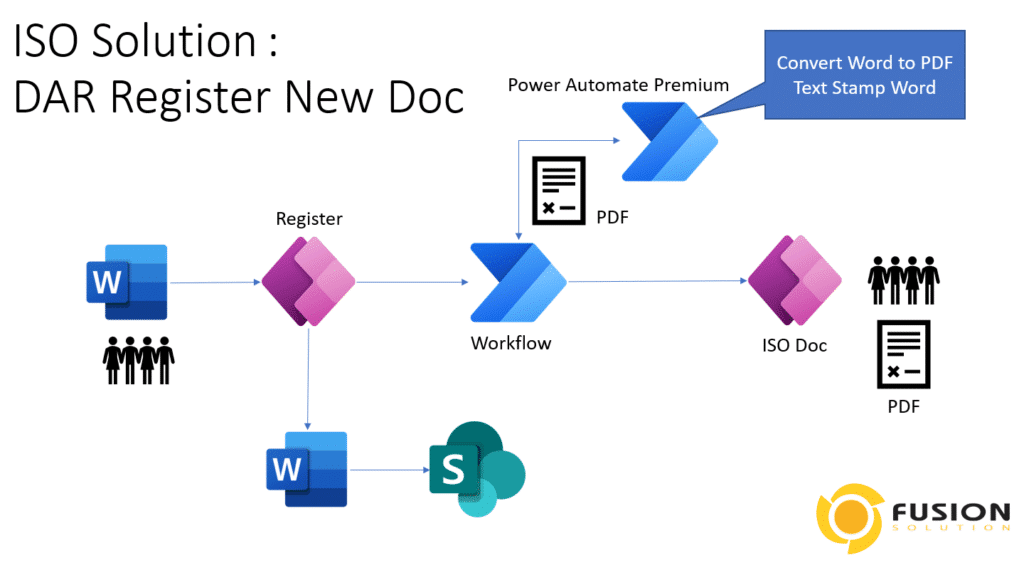
Power Automate It is part of Business Process Automation. To become a complete solution, it must have the following additional components:
- Power Automate for controlling the flow of data
- Power Apps for creating an interface for data recording and data retrieval.
- SharePoint to be a database for the system
Veracity solutions integrated with Microsoft 365 make paperless solutions a reality, reducing costs and enabling businesses to move faster than their competitors.
Fusion Solution Service
- Design and install the system
- Implement
- Customize
- Maintenance
Example of use by creating an Electronic Approval system (Power Automate)
Getting Started Steps
Starting to develop a solution after we have selected a solution to implement the system. Here we must divide the system development into phases. We will introduce the agency's form first because it is a document that must be created every day and many times a day.
It is recommended not to choose a difficult form because it will take time to implement and will yield little benefit. Instead, choose a form that is easy to use and will yield better results.
Paperless implementation involves two main steps: form and flow. We don't need to do them simultaneously. We recommend working on the form first, completing it, testing it, keying in data, printing it out, and making sure the work is complete before continuing with the flow.
Making the flow part easier or harder depends on whether the company can adapt to meet the app's standards. If they don't, it will be difficult to customize the system, which will lead to minor problems in the future.
Understanding Paper Less
- No one wants paper, so you don't have to print. If someone says they want paper, ask them if they want paper or data.
- No one is serious about the appearance of the form. Ask if you want complete information or if the form matches the paper.
- No one wants to sign documents. Try asking if they want convenience or want to sign documents.
- No one wants to hire people to compile data from paper, so if the data can be summarized into reports instantly, that's a cost-saving move.
- Reducing paper makes work faster.
- Reducing paper to data will save on printing and paper costs.
- Electronic identity verification is easier and more secure than signing physical documents, as paper documents can be easily forged.
- Digital storage is several times more economical than paper storage.
- When the data is in digital format, we can have the system fill in the conditions to help approvers do their job more easily.
- The accuracy and completeness of information when switching to Paperless will be better than paper because you can control the fields that are filled in. This helps to make the document accurate and does not require the use of staff to check it twice.
- Increase speed and flexibility in managing work systems because data can be accessed and approved from any status.
- You can easily analyze work data and improve work processes with Power BI, which can connect to the system.
Related content