DOVA OCR
OCR : Optical Character Recognition
Font converter
Fusion Solution provides system development, consulting, and installation services for the latest Microsoft OCR (Azure Cognitive Service) from Technogoly, which supports the Thai language, as well as a document management system based on Abbyy standards. CMMi 3 We offer development services for integrating document management systems with SAP or Office 365.
OCR คือ Optical Character Recognition (OCR) is a method for converting printed data into text, and then storing that text, characters, or numbers in a format suitable for further analysis, such as a database, Excel spreadsheet, or Word. This process is automated, eliminating the need for manual reading and re-keying, thus avoiding redundant work.
The system does not require software installation on the server; the entire system runs on Azure's cloud service and supports various deployment scenarios. online ocr Enabling document processing anytime, anywhere.
Automate document classifying, sorting and data capturing solutions
It automatically processes and retrieves data from structured, semi-structured, and unstructured documents such as mortgage documents, bank account transaction records, tax forms, questionnaires, application forms, contracts, and invoices. The data can be stored in various formats. extracted text For analysis or connection to other systems.
Power Automate AI is a document image processing system that can automatically classify, categorize, and read data from document images. With the capabilities of Microsoft 365's AI Builder, it can capture data from document images to develop automated document and data management processes for organizations. It can capture data from both formatted and unformatted document images.
Online OCR technology and system connectivity via OCR API.
In addition, technology online ocr Currently, it allows organizations to upload. image files For example, scanned PDF files, document photos, or documents taken with a mobile phone can be directly uploaded to the cloud without the need for complex infrastructure installation. The system can process the data and convert document images into... extracted text It's ready to use immediately and also supports connectivity via... ocr api By integrating with existing organizational systems such as ERP, accounting systems, document management systems, or workflow automation, it enables real-time automation, reduces redundant tasks, increases data accuracy, and efficiently handles large volumes of documents. This helps drive sustainable digital transformation across all departments within the organization.

DOVA OCR Main Features
- Import document images for processing via Watch/Hot Folder, Web Servicer (RESTful API)
- Supports BMP, DCX, DjVu, GIF, JBIG2, JPEG, JPEG 2000, PCX, PNG, PDF, TIFF and multi TIFF image files.
- It has automated image processing capabilities, including image deskewing, despeckling (image clean-up), mirroring and inverting, and color filtering before processing the image via OCR.
- Documents can be separated and classified (Separation and Classification) by reading the pattern and information in the document image.
- Able to capture printed data on document images with OCR: Optical Character Recognition technology for Thai, English and other languages, totaling 200 languages.
- It can capture hand-printed data on document images with ICR (Intelligent Character Recognition) technology for English language, in Fields, Frames, Underlined fields, Boxes and Comb-style fields, etc.
- Can read check marks, crosses and circles using OMR: Optical Mark Recognition technology.
- Can read Bar Code and QR Code data using OBR: Optical Bar-code Recognition technology.
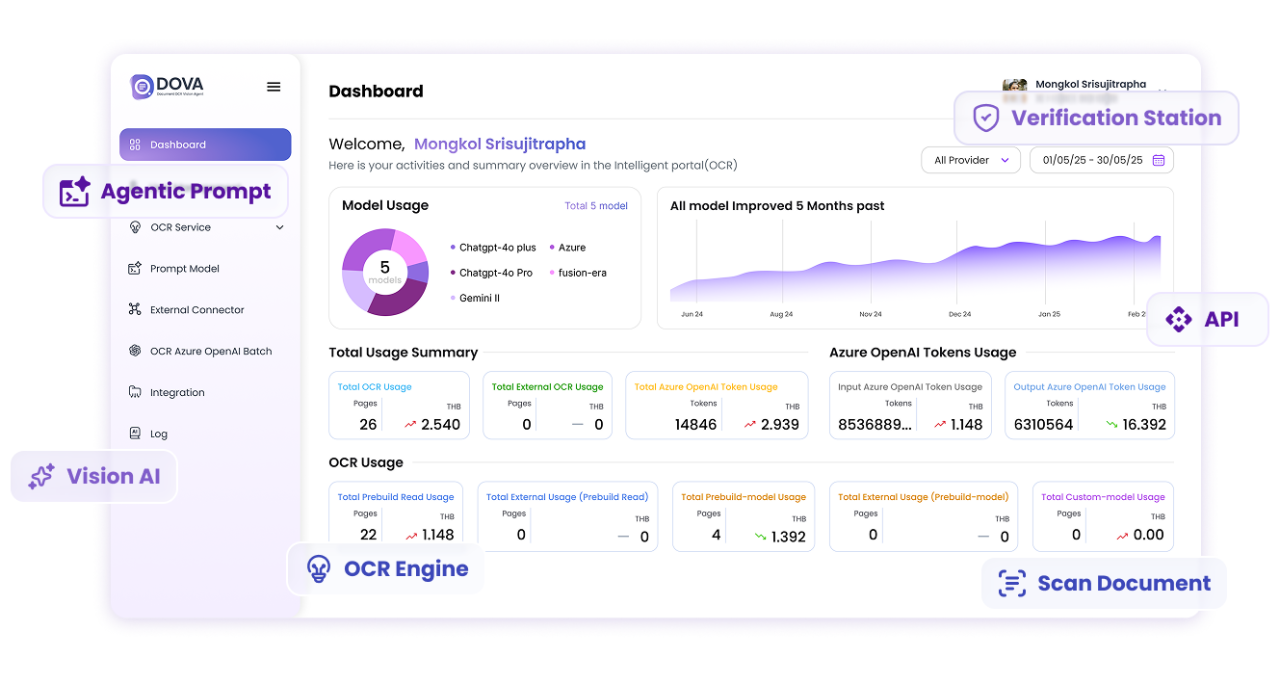
- There is Verification Station, a program for checking the readable data in document images.
- Verify according to Rules-based verification conditions, such as setting the verification to be based on the level of data accuracy (Recognition Confidential Level).
- There is a Task system for dividing work among data auditors.
- Data can be exported (Data Output) to CSV and saved to the database.
- The processed images can be exported as PDF, Searchable PDF or PDF/A, and PDF and PDF/A files can be compressed to smaller sizes with MRC: Mixed Raster Content.
- There is a report to follow up on the work results at every step.
- Send document files and data to be stored on SharePoint and OneDrive.
- Can be further developed to connect with other work processes and systems.
- Supports connection to Robotic Process Automation (RPA)

Fusion OCR
Extract information from all types of documents and convert it into usable digital data. In addition to converting images to text, the system can automatically interpret content, structure data, and identify key fields.
Prompt Generator
Create automated AI prompts that match your organization's specific format and requirements, enabling users to:
- Easier to write prompts
- You can use AI without needing technical or AI expertise.
- Reduce the time spent on trial and error with Prompt.
- The AI-generated results are more consistent and accurate.
External Connector
Seamlessly connect DOVA to your existing databases or third-party applications. The External Connector ensures continuous data flow, allowing you to send, receive, and synchronize processed data between platforms without manual intervention.
Human Validation Stage
Maximize accuracy with built-in human review processes. This system allows users to inspect retrieved data, modify fields if necessary, and verify document results before final processing. Ideal for workflows requiring high accuracy or a strong compliance focus.
Prompt Model
The AI model, specifically optimized for understanding and extracting information from documents, Prompt Model, can process complex documents, interpret content intent, and provide accurate results based on customized prompts, making automation smarter and more reliable.

Frequently Asked Questions (FAQ)
What is DOVA OCR?
DOVA OCR is an AI platform for intelligent document management that automatically performs OCR to extract data, classify documents, and convert them into digital formats. This reduces manual work and increases the speed of document processing within an organization.
What types of documents does DOVA support?
DOVA supports a wide variety of document types, including invoices, receipts, forms, contracts, HR documents, and handwritten documents. It also supports Thai, English, and other languages.
How accurate is DOVA OCR?
DOVA utilizes deep learning technology combined with a rule-based validation system to enhance the accuracy of document extraction. It also features a human validation stage, allowing users to review and verify information before real-world use.
Can DOVA integrate with the organization's existing systems?
DOVA features an External Connector that allows it to connect to ERP, HR, accounting, databases, Microsoft 365, and various third-party applications, enabling automatic data transfer and synchronization.
Does DOVA support AI Prompt?
Supports DOVA and includes both Prompt Generator and Prompt Model to automatically generate AI prompts tailored to your organization's workflow, reducing trial-and-error and ensuring more consistent and accurate AI results.